Define New Model (the Entry Model):
- Remember, a model tells Django how to work with data that will be stored in the app.
- To record what we’ve been learning about from our coding topics, we will need to define a new model for the kind of entries we can make.
- Below is the code for the Entry model:
models.py
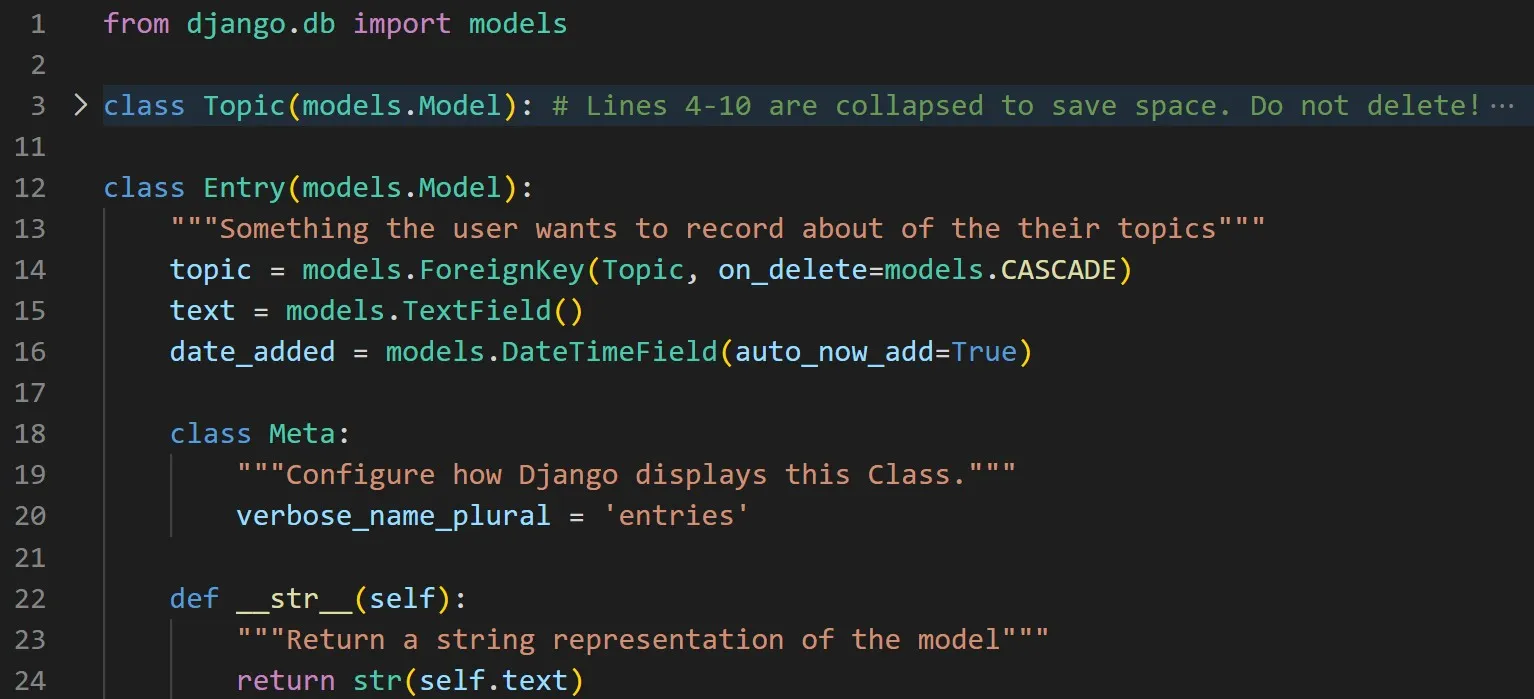
- In line 12, the Entry class inherits from Djanjo’s base model class, just as Topic did.
- In line 14, the first argument, Topic is a foreign key instance (a database term) to connect the two classes (tables) together.
- The TextField datatype in line 15 doesn’t need an argument because we don’t want to limit the individual entries.
The Meta Class:
- Meta holds extra information for managing a model.
- In line 20 it will allow us to set a special attribute telling Django to use Entires when it needs to refer to more than on entry.
Synchronize the Database Against the Classes:
- Whenever a new model has been defined, you need to migrate the database again. Here is the processes:
- You modify models.py, run the command python manage.py makemigrations code_journals, and then run the command python manage.py migrate
Register Models (the Entry model):
- To register the Entry model with the admin site, update the admin.py file to the following:
admin.py
python
1from django.contrib import admin
2
3from code_journals.models import Topic, Entry
4
5admin.site.register(Topic)
6admin.site.register(Entry)