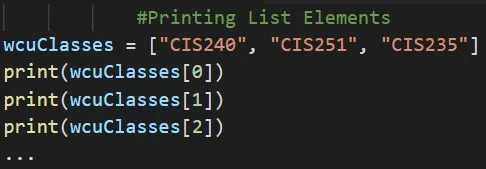
- In reference to the above code, are we going to call the print function every time? No, we shouldn’t repeat ourselves.
What is a for Loop?
- A for Loop in Python allows us to go through a list (or something called an iterable object) and repeat a certain block of code that we define for every element in our list.
What Does a for Loop look like?
- Let’s say we have a list of student names, and we want to print out each name in the list. We can use a for loop to print out each name in a list of students:
python
1students = [ "wilson", "peter", "alice"]
2for student in students:
3 print(student)- We begin by defining a list at (1), just was we did in the previous exercise. At (2), we define a for loop. This line tells Python to pull a name from the list of students, and store in the variable student. At (3) we tell Python to print the name that we just stored in student. Python repeats lines (2) and (3), once for each name in the list.
- This code can be read as “for every student in the list of students, print the student’s name.” Here is the output from the above three lines of code:
1wilson
2peter
3alice
Appropriate for Loop Naming Conventions:
- It is helpful to choose a meaningful name that represents a single item from the list. For example, here’s a good way to start a for loop for a list of cats, a list of dogs, and a list of topics:
1for cat in cats:
2for dog in dogs:
3for topic in topics:
Doing Something Following a for Loop:
- Any lines of code after the for loop that are not indented are executed once without repetition. Example:
python
1students = ["wilson", "peter", "alice"]
2for student in students:
3    print(student)
4
5print("\nThe above students are enrolled in CIS240")
Output:
1wilson
2peter
3alice
4
5The above students are enrolled in CIS240
Avoiding Indentation Errors:
- Python uses indentation to determine how a line, or group of lines, is related to the rest of the program.
- Python’s use of indentation makes code very easy to read. In the students for loop example, the lines that printed messages to individual students were part of the for loop because they were indented.
- Always indent the line after the for statement in a loop. The colon at the end of a for statement tells Python to interpret the next line as the start of a loop.