Project 1:
Project Specification: Build a new Django project. Write an app called budget_app in a project called budget_log that allows users to record transactions in the form of credits and debits.
-
(20 points) Create a parent folder called Project1-Django.
-
a. Create a new project by by issuing the below command in the terminal:
1django-admin startproject budget_log .- i. The project should be created using Django version 6.1
- ii. Create the database for the project and make sure the project runs on the development server: http://localhost:8000
-
b. Add an app and name it,
budget_app
-
-
(30 points) Define your first model,
Transactionwith two fields (attributes):transaction_typeanddate_added.- a. The
transaction_typeattribute should have a CharField datatype. Give it a max_length of 200 characters. - b. The
date_addedattribute should have a DateTimeField datatype. Pass in the argument, auto_now_add=True.
- a. The
-
(20 points) Setup the Django Admin Site and create a superuser.
- a. The username should be: bl_admin. Make sure to use your school email address for the Email. Use the following password: a12345678
-
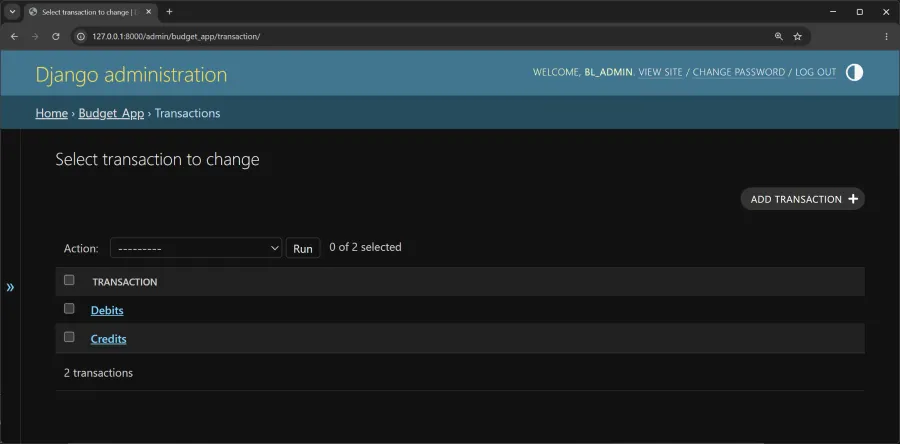
(30 points) Register the model,
Transactionwith the Django Admin site.- a. Once logged in to the admin site, add the two transaction database objects: Credits and Debits
- Generative artificial intelligence tools (ChatGPT, Claude, Copilot, etc.) are not allowed to be used on projects. The project code should directly reflect and relate to the material covered in our course notebook.
- Submission Instructions: The project will be due on Friday, October 30 by 11:59p. Zip/Compress the project folder and submit to Canvas.
The Django admin site should look like the following when you have completed the project: