A Brief Recap…
- Currently, only a superuser can enter data through the admin site, or by using Groq 😉.
- However, we don’t want users to interact with the admin site, so we can use Django’s form building tools to build pages that allow users to enter data.
Adding New Topics
- We want to give users the ability to add a new topic which can be handled by adding a form-based page:
- Define a URL
- Write a view function
- Write a template
- Use the forms.py module
The Topic ModelForm
- The simplest way to build a form in Django is to use a ModelForm, which uses the information from the models we have previously defined.
- Write your first form in the file forms.py, which you should create in the same directory as models.py:
forms.py
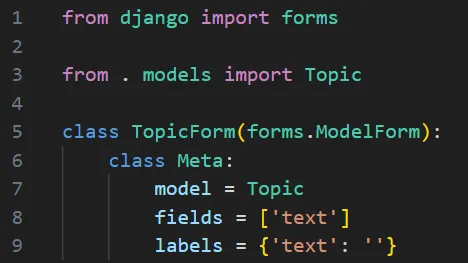
- We first import the forms module and the model we’ll work with, Topic
- In line 5, we define a class called TopicForm which inherits from forms.ModelForm. The nested Meta class in line 6 tells Django which model to base the form on and which fields to include in the form.
- In line 7, we build a form from the Topic model and include only the text field (line 8).
- Note that line 9, we instruct Django to NOT generate a label for the text field.
The new_topic URL
- When the user wants to add a new topic, we’ll send them to http://localhost:8000/new_topic/
- Here’s the URL pattern for the new_topic page, which we add to code_journals/urls.py:
urls.py
python
14#--snip--
15urlpatterns = [
16	#--snip--
17	#Page for adding a new topic
18	path('new_topic/', views.new_topic, name='new_topic'),
19
20]- This URL pattern will send requests to the view function new_topic()