Adding New Entries:
- To enable a user to add new entries, we must:
- Define a URL
- Write a view function
- Write a template
- Add another class to forms.py
The Entry ModelForm:
- Create a form associated with the Entry model.
forms.py
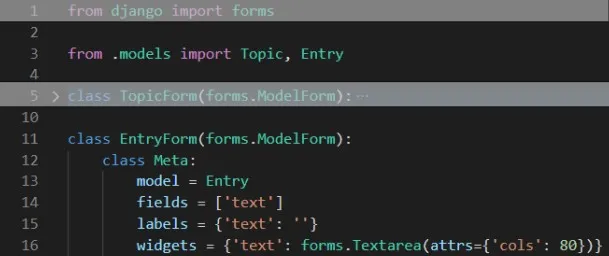
- In line 3, we update the import statement to include Entry as well as Topic.
- In line 16, we include the widgets attribute.
- A widget is an HTML form element, such as a single-line text box or drop-down list.
- By telling Django to use a forms.Textarea element, we’re customizing the input widget for the field ‘text’ so the text area will be 80 columns wide instead of the default 40.
The new_entry URL:
- We need to include a topic_id argument in the URL for adding a new entry.
- Add to code_journals/urls.py:
urls.py
python
17# --snip--
18urlpatterns = [
19	# --snip--
20	# Page for adding a new entry
21	path('new_entry/<int:topic_id>/', views.new_entry, name='new_entry'),
22
23]- This URL pattern matches any URL with the form http://localhost:8000/new_entry/id/, where id is a number matching the topic ID.
- The code int:topic_id captures a numerical value and stores it in the variable topic_id.
- When a URL matching this pattern is requested, Django sends the request and the ID of the topic to the new_entry() view function.
The new_entry View Function:
- The view function for new_entry is much like the function for adding a new topic:
views.py
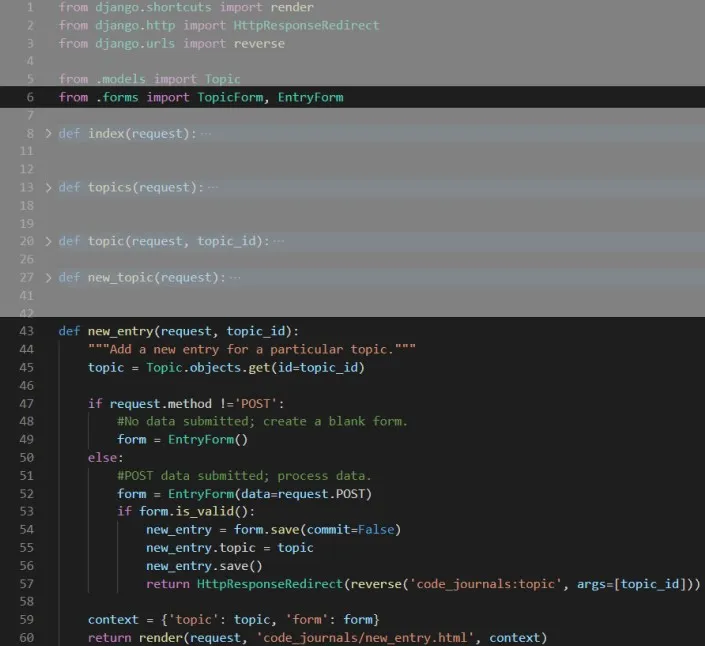
- In line 6, we update the import statement to include the EntryForm. The definition of new_entry() has a topic_id parameter to store the value it receives from the URL.
- In line 47, we check if the request method is POST or GET. The if block executes if it’s a GET request, and we create a blank instance of EntryForm.
- When we call save(), we include the argument, commit=False to tell Django to create a new entry object and store it in new_entry without saving it to the database yet. We then set new_entry’s topic attribute to the topic we pulled from the database at the beginning of the function in line 55, and then we call save() with no arguments. This saves the entry to the database with the correct associated topic.
- In line 57, we redirect the user to the topic page. The reverse() call requires two arguments:
- The name of the URL pattern we want to generate a URL for.
- An args list containing any arguments that need to be included in the URL.
The new_entry Template:
- The template for new_entry is similar to the template for the new_topic:
new_entry.html
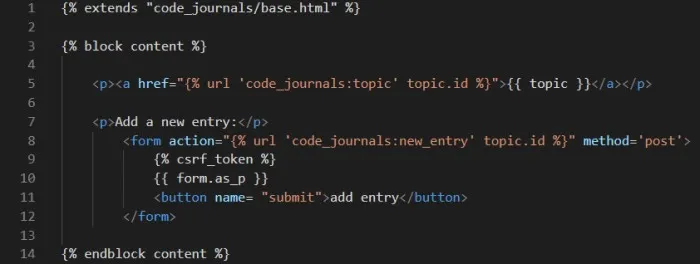
- In line 5, we show the topic at the top of the page, so the user can see which topic they’re adding an entry to. Note this also acts as a link back to the main page for the topic.
- In line 8, the form’s action argument includes the topic_id value in the URL, so the view function can associate the new entry with the correct topic.
Linking to the new_entry Page:
- Include a link to the new_entry page from each topic page:
topic.html
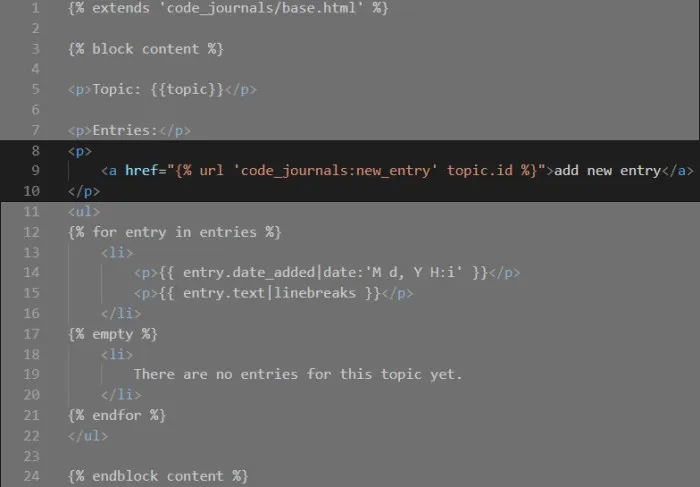
- Add the link just before showing the entries. Now users can add new topics and as many entries as they want for each topic.